
POSTMAN BEST PRACTICES
Internal API Distribution and Discovery
Building quality APIs has never been more important. At Postman, we believe being API-first is the key to innovation in the AI era. We built Postman Best Practices to share the foundational ideas Postman is built on and enable you to do your best work.
In a modern enterprise, the APIs you build internally are often your most strategic asset. At Postman, we believe every developer and AI agent in your organization should be able to find, evaluate, and integrate with the right API at the right time—without friction, guesswork, or tribal knowledge.
Most internal API programs don't fail because the APIs are poorly designed. They fail because developers can't find them. Specifications drift from production reality, teams duplicate work because they don't know a service already exists, and AI coding tools generate incorrect code because they have no access to your internal contracts.
This chapter shows you how to build a Private API Network that stays accurate automatically, organize your teams around domain-specific ownership, and create a discovery experience that works for both human developers and the AI agents they work alongside.

Abhinav Asthana
Postman CEO and Co-founder

Ankit Sobti
Postman Field CTO and Co-founder
Effective Internal API distribution ensures that your developers and AI agents are able to find, evaluate, and integrate with the right APIs at the right time. By leveraging the Postman Private API Network, enterprises eliminate "API silos" and ensure that internal discovery is accurate and seamless.
In a modern enterprise, API discovery is no longer a manual documentation effort; it is a git-driven workflow that provides a verified path from code to consumption. By utilizing Organization-level team structures and workspace-centric automation, engineering managers can ensure their Private API Network is always accurate, synchronized with production, and ready for both human developers and AI-assisted coding.
Setting up Organizations and Teams
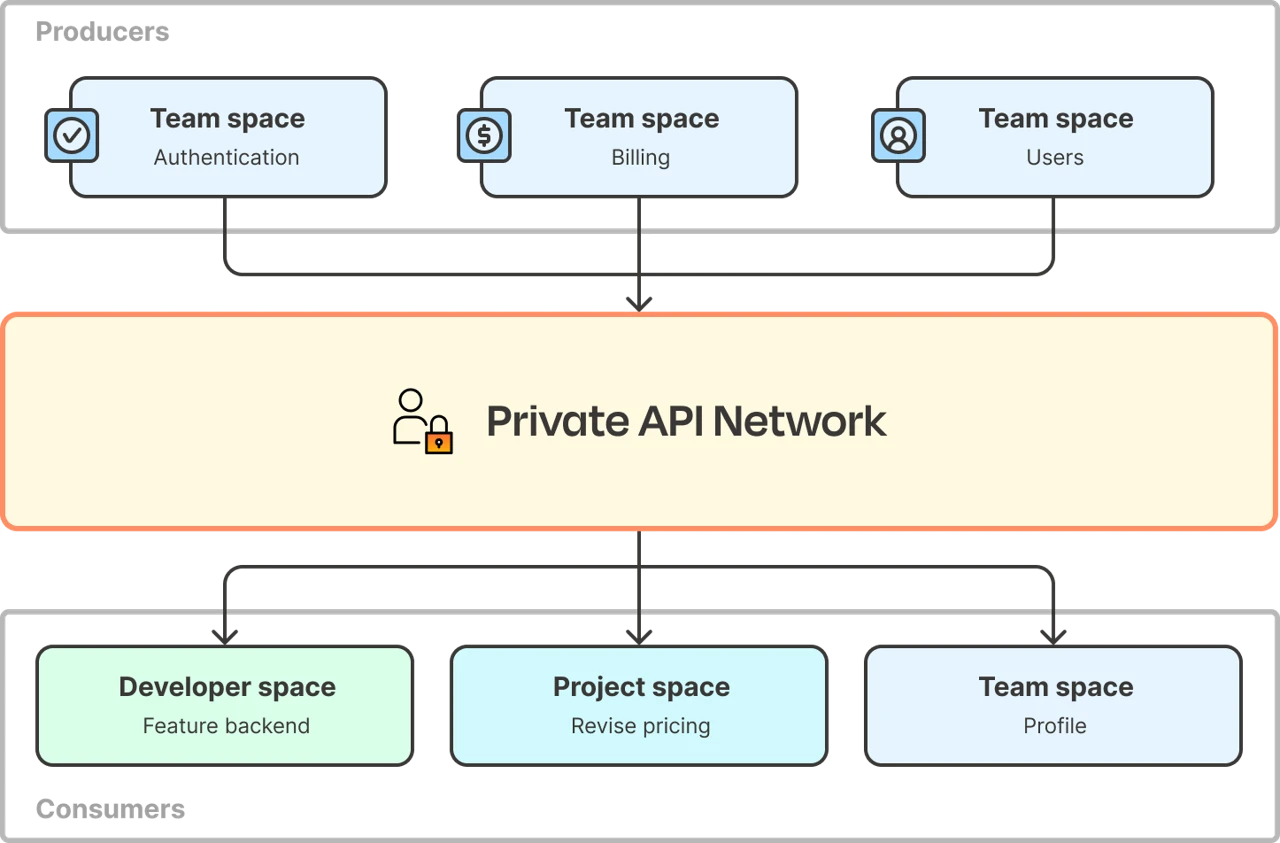
While you can manage your Private API Network (PAN) as a single team, scaling discovery requires moving from a "list of things" to a "map of capabilities."
- Without Organizations enabled: All workspaces exist under one team. While you can use Tags to filter and group APIs, the UI remains a single list.
- With Organizations enabled (Highly Encouraged): You map Postman to your actual engineering org. You create Teams (e.g.,
Payments,Identity) that act as domain-specific containers for their respective workspaces.
Organizations allow you to decentralize the bottleneck of API approvals, placing the power in the hands of the people closest to the code while still maintaining an org-wide management role. Learn more about Organizations by reading our docs.
| Role | Scope | Discovery Responsibility |
|---|---|---|
| Private Network Manager | Organization-wide | The "Global Admin" who sets the standards and oversees the entire network. |
| Team Manager | Team-specific | The "Domain Gatekeeper" who approves which workspaces are ready to be published to the Private Network for their specific team. |
With this structure, the discovery path becomes intuitive. For example, a developer looking for a "User Profile" endpoint doesn't need to search through 500 random workspaces to find what they're looking for. Instead, they navigate directly to Identity Team › User Service Workspace.
Setting up your workspaces for consumption
Every project, or set of APIs, should have a dedicated Postman Workspace that is linked to its source code via Postman's Native git support. This allows you to manage API documentation alongside code, and automate updates via CLI, eliminating the dreaded "documentation lag".
Link the workspace to git
Connect your Postman workspace directly to your git-initialized local file system. This integration works with all git providers (cloud and self-hosted) and embeds Postman directly into your existing development workflow.
- Unified file system: Your collections, specifications, tests, and mocks are stored as files within your repository (under the
/postmandirectory). - Git-native workflow: Use your familiar branching and pull-request strategies to manage API changes.
- Synchronized development: Developers can modify code and Postman artifacts in a single PR, ensuring the API implementation and its documentation never drift.
Everything in one place
A discoverable workspace must be self-documenting and ready for immediate use. When a developer finds your service in the Private Network, it should contain at least the following:
- Specification: The formal contract that defines the API's behavior, hosted as the single source of truth.
- Collections: A set of pre-configured requests that allow a consumer to hit "Send" and see a response immediately.
- Environments: Pre-defined variables (e.g.,
base_url,api_version) so consumers don't have to guess configuration details.
High-signal metadata
To make the workspace searchable and useful within the Private Network, use Tags and Descriptions effectively:
- Description: Rather than a simple descriptor (e.g. "The Billing API"), share the intent: "Use this for processing PCI-compliant transactions in the North American region."
- Tags: Use functional tags like
Internal-Only,v2-Deprecated,PCI-Compliant, orgRPC. - Visibility: Ensure the workspace is set to Team(Org) visibility so it can be nominated for the Private API Network.
(Optional) Setting up a separate Discovery workspace for consumption
You can also set up a separate Discovery workspace for consumption. This is recommended when:
- You want only a subset of collections to be broadly discoverable (e.g. prevent sharing app-specific endpoints or test collections).
- You want to organize collections across multiple related repos (workspaces) into a single consumer-focused workspace.
To set up a separate Discovery workspace for consumption, the recommended approach is as follows:
- Keep your git-linked workspace visible to your immediate team.
- Create a curated, consumer-ready collection with only the APIs intended for broader use.
- Fork that collection into a separate Discovery workspace and enable auto-sync for forks.
- You can fork multiple collections across related repos to the same discovery workspace.
- Publish the Discovery workspace to the Private API Network.
This approach separates build-time complexity, prevents misuse of internal/app-specific endpoints, and provides a simpler experience for consumers.
Tip: Use Agent Mode to set up your Discovery workspace. Speed up the setup of the Discovery workspace by having Agent Mode handle it for you. From the workspace, simply instruct Agent Mode: "Set up this workspace for consumption."
Automating ongoing updates for your workspace
Using the Postman CLI, you can treat your Postman workspace as a deployment target, triggering tests, linting, and synchronization every time code is merged or deployed to a specific environment. This step moves the responsibility of updating documentation from the developer to the CI/CD pipeline, ensuring 100% parity between your repository and the Private API Network.
Implementation steps
- Install and authenticate: Add the Postman CLI to your CI environment (e.g., GitHub Actions, GitLab CI, or Jenkins). Authenticate using a Postman API Key stored as a protected secret in your CI provider.
- Lint the specification: Add a step to run
postman api lintagainst your OpenAPI spec on every Pull Request. Configure this to fail the build if "Error" level governance violations are detected, catching design flaws before they are merged. - Synchronize to workspace: On a successful merge to your
mainbranch, execute thepostman workspace pushcommand. This command scans your/postmandirectory and updates the collections, specs, and environments in your Postman workspace to match. - (Optional, but recommended) Execute contract tests: Run
postman collection runagainst your staging environment as a deployment gate. This confirms that the code you just deployed actually adheres to the executable documentation stored in your workspace.
This turns API documentation into a byproduct of the development process rather than a separate chore, maintaining a high-trust discovery environment with zero manual upkeep.
Publishing to the Private API Network
The Private API Network is the 'storefront' where other teams find the right APIs to use. The discovery experience is now Home (Org) > Team > Workspace and can be navigated via the top-left switcher and selecting Private API Network.
- Publishing to the Private API Network: A developer within the
Paymentsteam requests to add theirprocessing-apiworkspace to the Private API Network. - Team-level approval: The
PaymentsTeam Manager (role) reviews and approves the request. - Discovery hierarchy: Anyone browsing the Private Network will see a clean, curated view:
- Payments Team
- Credit Card API (Workspace)
- Refunds API (Workspace)
- Identity Team
- Auth API (Workspace)
- Payments Team
- Filtering by tags: You can add various
tagsto a workspace, which will show up in the Private Network. You can then filter by tags to return a subset of workspaces that meet the filtering criteria, providing a powerful and flexible way to group workspaces in different ways.
Using information in the Private API Network
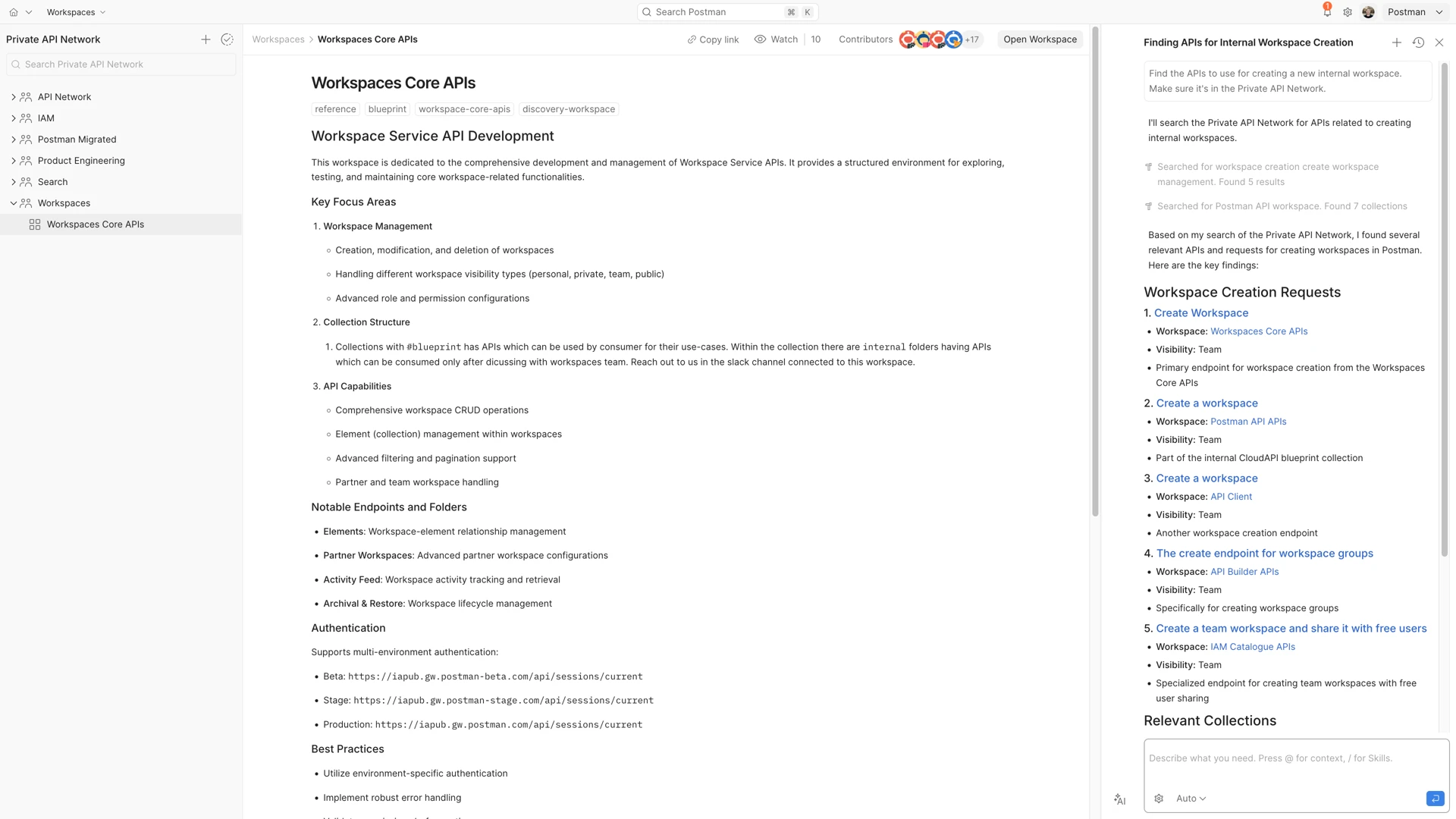
The Private Network isn't just about having a place to browse a curated list of APIs. It's also about making that data accessible wherever the developer is working—whether that's the Postman UI, an internal AI assistant, or their IDE.
By centralizing your "source of truth" in the Private API Network, you enable a multi-channel discovery experience that meets engineers at their point of need:
- Direct browsing: Direct developers to the Private API Network via top-left navigation dropdown. This provides a high-level, domain-driven view organized by Teams, allowing users to browse verified workspaces and related information.
- Search bar: Use the global search bar (
Cmd/Ctrl + K) to find APIs instantly.- Look for the purple checkmark icon next to results, which indicates an API is a verified member of your Private API Network.
- Use the "Private Network" filter in the search dropdown to exclude public or unverified internal results, ensuring you only integrate with approved services.
- Postman AI: Engage with the Postman AI assistant located in the right-hand sidebar. Developers can ask natural language questions like "Which team owns the payment refund API?" or "Show me how to authenticate with the Identity service." The AI leverages the Private API Network to provide accurate, context-aware answers.
- External AI and IDE integration: Connect external coding tools like Claude, Cursor, or VS Code to your internal API catalog via the Postman MCP (Model Context Protocol) Server.
- Search tooling: By exposing the Postman Search API through the MCP server and first-party integrations with major AI tools (e.g. Claude Code, Cursor, Vercel and more), your external AI agents can search your Private API Network in real-time.
- Code generation: AI agents can pull the exact specifications and SDK details from your verified workspaces to write higher-quality, production-ready code without the developer ever leaving their editor.
Key outcomes
When you implement this guide, you achieve three critical outcomes:
- Accuracy and trust through automation: Your Private API Network remains accurate because it is updated by your CI/CD pipeline, not by human memory.
- Efficiency through federation: Team Managers own their domains, removing bottlenecks and ensuring that those closest to the code are the ones verifying its readiness.
- AI-readiness: By centralizing your specs and metadata, you provide the necessary context for Postman AI and external IDE agents to generate accurate, production-standard code.
The result is a self-sustaining ecosystem where developers and agents spend less time "hunting" for endpoints and more time building features.
Ready to get hands-on? Publish your first workspace to the Private API Network →